

____________________________________
Guest Post by Dave Ruch, Originally posted on the Educate and Entertain BlogThere’s no shortage of tutorials on the web to show you how to create an ad on Facebook – I’ll link to a few really good ones at the bottom of this post.What I’m here to talk about today is what you can accomplish with Facebook advertising, and why you might want to give it a try (or take your efforts up a notch).Musicians, storytellers, and other independent performing artists – this is specifically for you.
What Can I Do With a Facebook Ad?
Here are several things you can do with a Facebook ad…#1. Reach The People Who’ve Liked Your Page
It used to go without saying that if someone “liked” your page, and you then posted an update, there was a good chance that person would see your update without it costing you a cent.Sadly, those days are over. It’s been well documented that the average post on your Facebook page today is shown to only a tiny percentage of the people who’ve “liked” you – as little as 1-3% in some cases, and very often under 10%.That leaves 90+% of the people who’ve already connected with you who won’t see your post unless you “boost” it.
It’s OK to Pay (to Play)!
In my opinion, it makes perfect sense to pay a little bit of money to reach those people.I think about it this way – I’d have to pay to send them something in the mail, and it would even cost me some cash to send them emails through my email service provider.
#2. Reach People Who’ve Liked Other Pages
If you could reach the fans of other select Facebook pages in your niche, would that be helpful? It might be…Through the Ads Manager (or Power Editor) you can actually target the people who’ve liked some of the important and popular pages in your industry. (Not every page is available for targeting.)
Some Examples
Let’s say you’re a storyteller looking for more gigs in Massachusetts libraries – why not target people from your region (you can do that too) who’ve “liked” the Public Library Association’s page? Many of those folks are likely to be librarians, right?Maybe you’re a rap artist – when your new recording comes out, how about targeting fans of Eminem, or Ice Cube, who live within 25 miles of your town, offering them a free download and discounted tickets to your release party?WHAT TO DO: Locate pages that have an audience you’d like to “borrow,” then type the name of that page – letter for letter – into the “Detailed Targeting” box in the Ads platform. Some will appear, and others won’t – nothing you can do about those that don’t.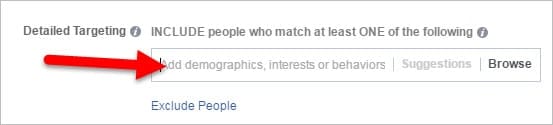
#3. Reach People Who’ve Visited Your Website
Let me ask you a question – – how many people have visited your website over the last 30 days? (Check your website analytics to find out.)Now, can you estimate how many of those visitors you actually heard from via a contact form on the site, or an order, or a direct email, or phone call?Big difference, huh?
The Good News: All is Not Lost
Installing the Facebook pixel on your site (DIY’ers can do this themselves, or your webmaster can easily take care of it) will allow you to reach every Facebook user who visited your website over the time period you specify (up to 180 days), whether you ever heard from them or not.But it gets better!This Custom Audience feature also allows you to create separate audiences of people who’ve visited specific pages on your site.How would you use that? Here are just a few ideas:- people who visited your pricing page are likely to be interested in hiring you – target them with an ad about your performances, or a discount
- those who looked at your calendar page might want to come see you live, right? Advertise your upcoming dates to them
- people who spent time on your “Programs for Schools” page are likely to be teachers or PTA folks who book school programs
#4. Reach Your Email List
Wait, what?You’ve already got an email list of clients, potential customers, or fans, and you know how to reach them right in their inboxes – why in the world would you pay to advertise to them on Facebook?A few reasons:a) People don’t always respond to the first message or promotion they see, so multiple impressions coming from multiple sources is effective. Always has been.b) People are likely to be in a different frame of mind when they’re scrolling through Facebook vs. when they’re doing triage on their email inbox. They may be more receptive to your message when it’s mixed in with other things they like, especially if your post is engaging, humorous, or otherwise really valuable.
c) Your list member may have stopped reading your emails long ago, or never saw them to begin with because the messages are being diverted to a “junk,” “spam,” or “promotions” folder.
WHAT TO DO: Choose “Create New Custom Audience” (see diagram), then “Customer List,” and upload your list of fans or customers as a .csv or .txt file.
#5. Reach More People LIKE Your Fans or Clients
One of the really cool features within the Facebook Ads platform is the ability to create a huge audience of people who share attributes with the people on your email list, those who’ve “liked” your page, and/or those who’ve visited your website.In other words, an audience that “looks like” (to Facebook, anyways) your current fans or customers, or even the people who hire you.Lookalike Audiences: A Warning
It’s important to note that your Facebook lookalike audience is going to be hundreds or thousands of times larger than the fan or customer universe you’re starting with.
Here’s how…
When setting up your ad, target only those in your lookalike audience (let’s say that’s 2 million people) who also fit some other criteria that would be important.For instance, if you’re hoping to reach people most likely to be interested in your edgy acoustic singer-songwriter material, target people who “look like” your fans but also have liked specific folk festival pages and/or artist pages and/or record labels. You get the picture.
You can also refine things based on geography, job title, interests, and lots more.
WHAT TO DO: To create lookalikes of your email list, upload the list as in #4 above, then choose “Create Audience” > “Lookalike Audience,” then type in the name of the list you uploaded. To create lookalikes of your website visitors or Facebook fans, choose “Create Audience” > “Lookalike Audience” and type in the name of your website list or Facebook page. I’d recommend dialing the audience size down as far as you can on the sliding scale that Facebook provides.#6. Grow Your Email List
NOTE TO READER – Notice that says grow your email list, not grow your Facebook fans – an email address from an interested party is always going to be more valuable than a “like” on social media.Those Facebook “likes” will come anyways, however, as a natural outcome of doing some FB advertising to a tightly targeted group of people.
How To Grow Your Email List on Facebook
There are a million ways to do this, but one tried and true method is to offer a “lead magnet,” i.e. something of real value you give away in exchange for the email address.DON’T give away an iPad, or anything else that’s “off brand” – that will only get you a bunch of email addresses from people who have no interest in what you do. (You’ll also go broke.)
Instead, think about the kind of people you want on your list.
Are you courting new fans? More gigs? Attendees for your local performance?Let’s look at one advertising scenario for each of those goals, keeping in mind that the best ideas will come from you:New Fans – Give away a private video of one of your performances, or three free songs (or stories, or digital versions of whatever you do) as a download, then follow up to continue to engage these new fans.More Gigs – I’ve hosted several free online events for schools and used those as lead magnets. Advertising a “free online concert for elementary schools” on a specific date and time has brought thousands of new teachers into my universe, many of whom have gone on to book me for live events and other paid online programs. Using Facebook, I can target teachers in states and even countries that would never have heard of me before.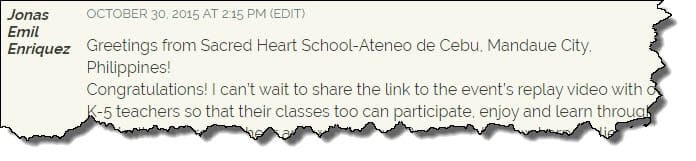 Concert Attendees – Offer something exclusive to anyone who “reserves” a seat (even if there are no reservations) for your next event. When they show up at the door, you have their name and can give them…what? You decide. The best part is that even for those who don’t end up attending, you now have their email address and know that they are at least somewhat interested in what you do. So, you can continue to let them know about other upcoming events, new projects, etc.
 Facebook Marketing
Some Recommended Resources
Now, for those tutorials I promised at the beginning of the article.