For decades, the biggest hurdle for touring artists hasn’t been selling out the venue—it’s making sure fans actually know the show is happening. We’ve all seen the desperate, last-minute tweets: "NYC! I'm playing tonight! Why is this room empty?"
The ecosystem of tour promotion was fragmented. Fans streamed music on one app, discovered shows on another, and bought tickets on a third. Every friction point is a lost ticket sale. Bandsintown has been working to change that for the 700,000 artists and tens of thousands of venues, festivals and promoters who use the platform.
Now Bandsintown has added Apple Music to their growing global distribution network alongside Spotify, YouTube Music, YouTube, Shazam, Google, Bing and more.
As with the other streamers, Apple Music's new native integration with Bandsintown creates a "stream-to-ticket" pipeline that connects fans with concerts while they are streaming music.
Concert listings are available on devices running iOS 26.4, currently in public and developer beta, with a broader release coming soon.
Here is everything you need to know about how this new integration works, why it matters, and how you should be using it to pack your next show or tour.
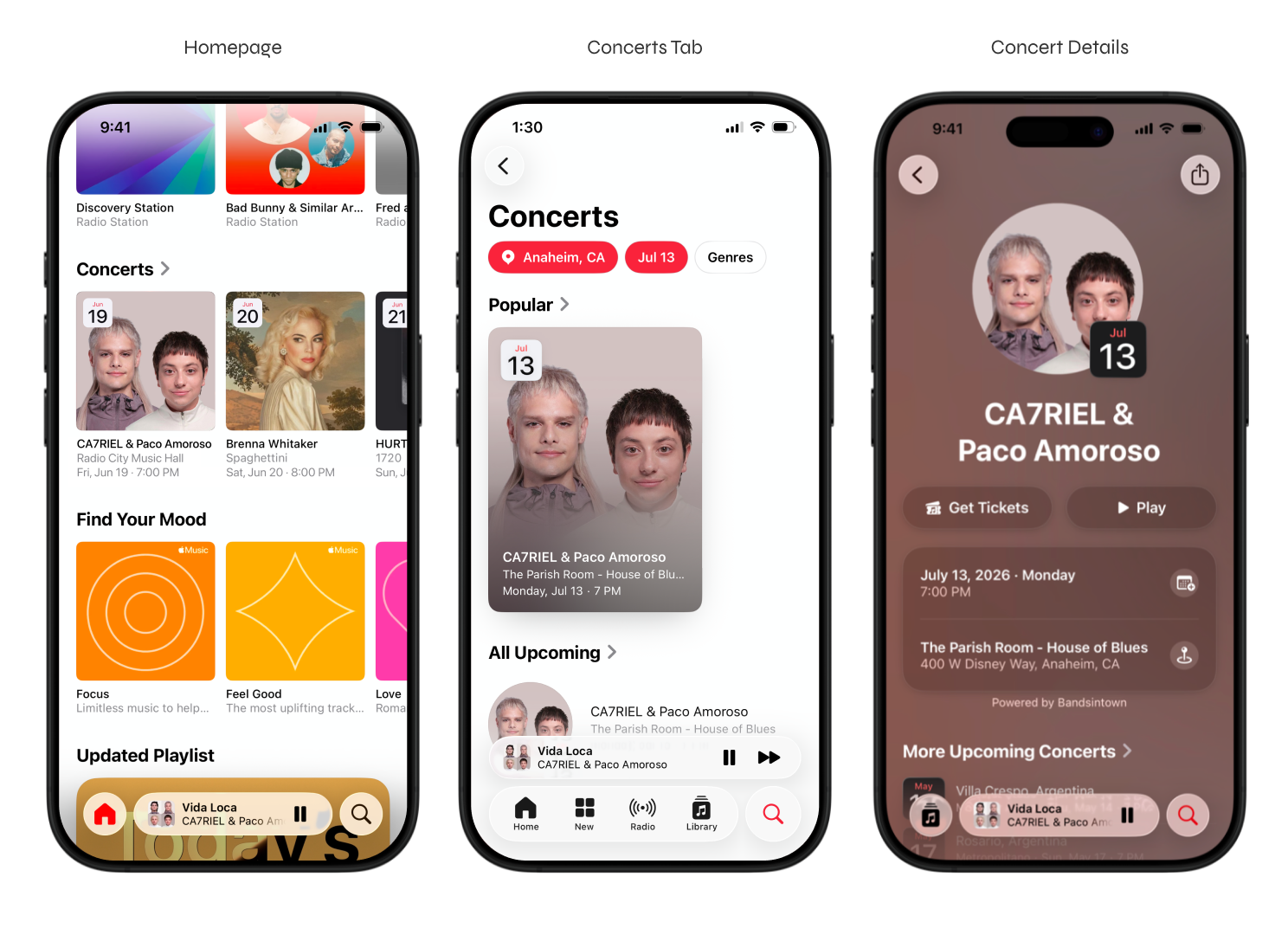
How Apple Music + Bandsintown Works
The goal of this integration is simplicity: Meet the fans where they already are. Rather than forcing a listener to leave Apple Music to check your tour routing, Apple is now bringing the box office directly into the streaming experience.
This integration aggregates data not just from Bandsintown, but also leverages Apple’s ecosystem (Shazam, Maps, Spotlight) to create a multi-touchpoint discovery network.
The Apple Music Artist Page
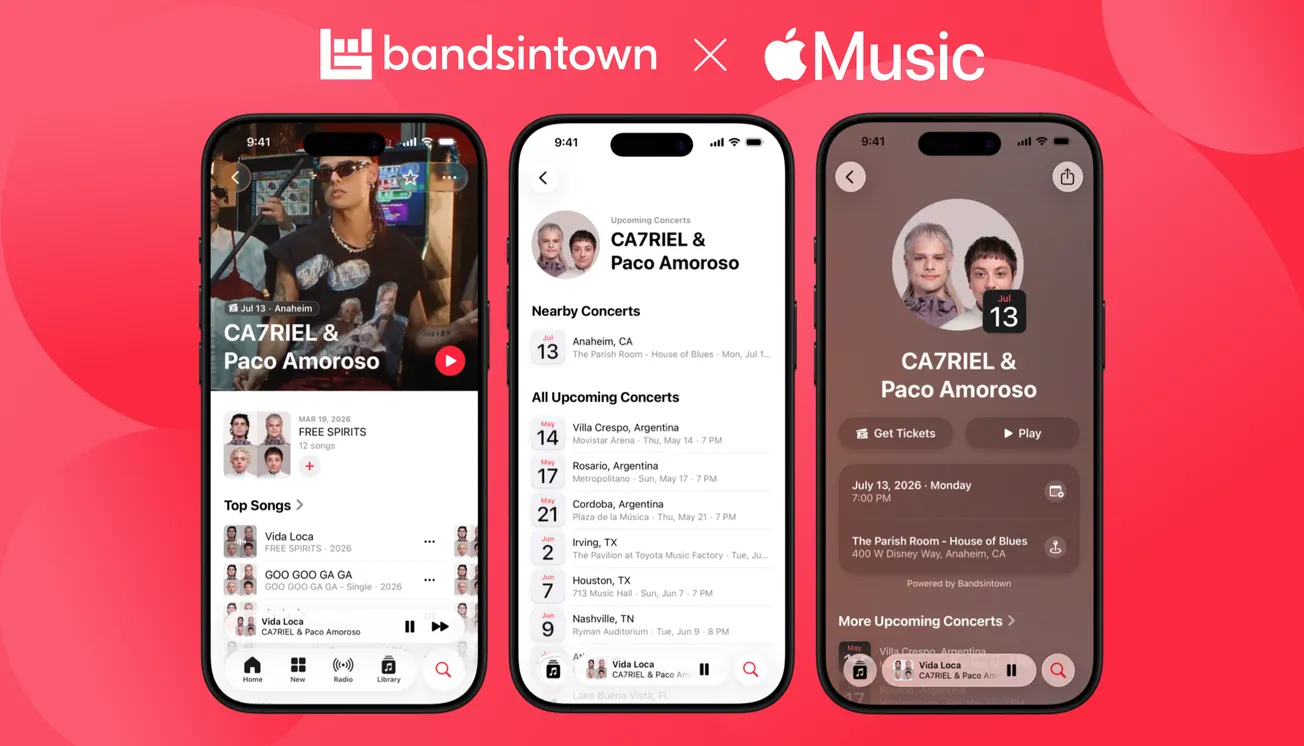
The Artist Page on Apple Music is no longer just a digital discography. When dates are listed on Bandsintown, a new “Nearby Concerts” badge automatically appears near the top of the Artists pageif there are shows near the user.
Further down the page a “Nearby Concerts” section appears in the profile as well as an “All Upcoming Concerts", listing the next 5 shows, and linking to a Concerts page with all upcoming shows. Included are venue details and official ticket links.
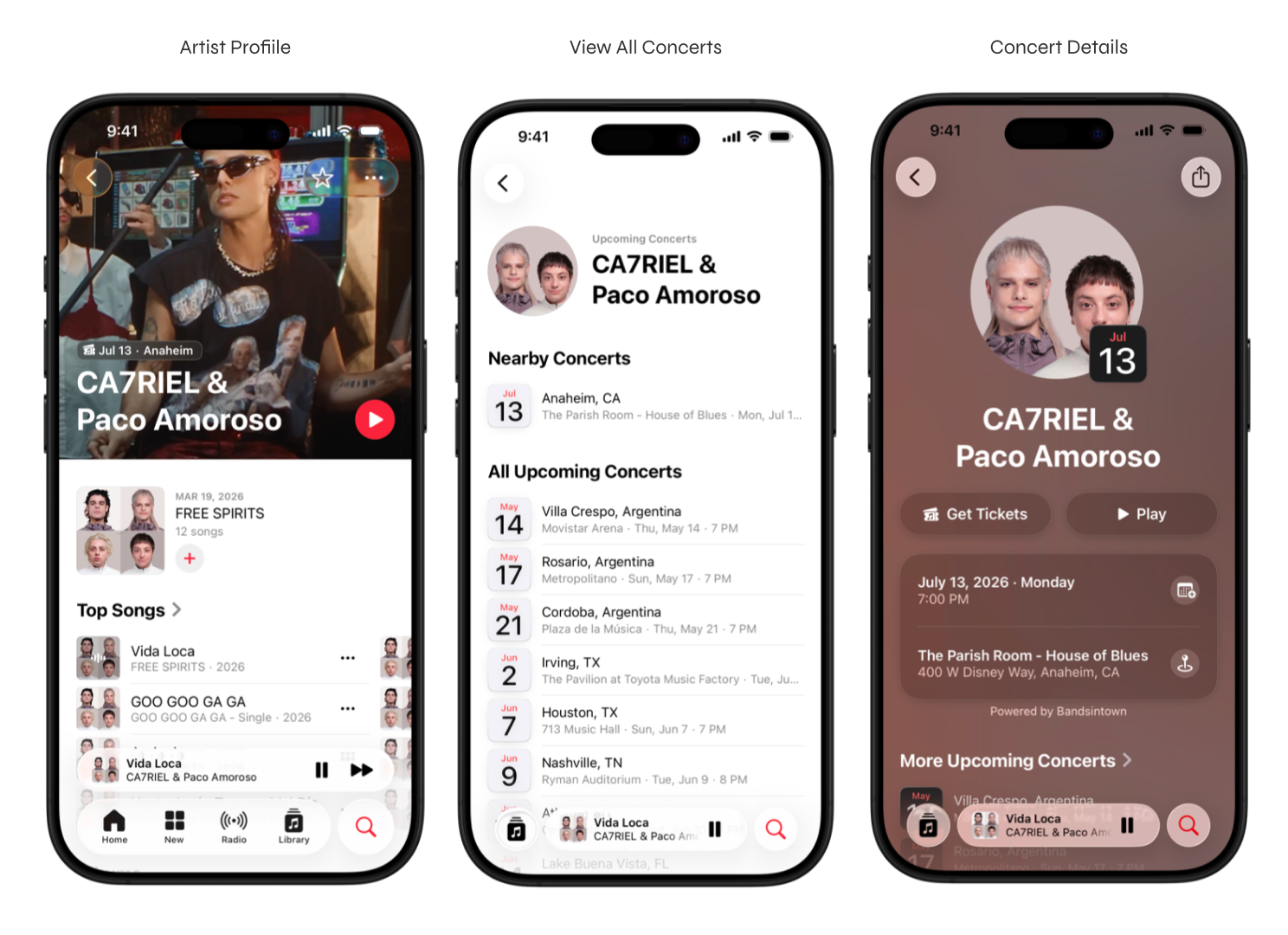
Personalized Discovery
The Apple Music home tab now features a personalized carousel called "Upcoming Concerts." This isn't random; it's algorithmic. It pushes show dates to users based specifically on their listening history. If they have your tracks on repeat, they will see your tour announcement.
The Search page now includes a Concerts tile linking to a personalized geo-localized Concerts page with Popular concerts, concert recommendations for this week, next week, and more upcoming.
In the new Concerts Tab (Search → Concerts) fans can browse shows by location, date, and genre.
Native Notifications
When you announce a new tour, Apple Music can now push native iOS notifications to fans who "Favorite" or follow you on the platform, alerting them to nearby shows.
Cross-Platform Synergy: Maps, Shazam, and Spotlight
The integration extends beyond the music app to other corners of the Apple ecosystem:
- Apple Maps: If users search for a venue, they can see your upcoming show there, add it to their calendar, and buy tickets via a direct Shazam link.
- Shazam: When a fan Shazams a song, the app now shows them any nearby dates for the artist,
- Spotlight Search: If a user searches for an artist name in the main iPhone search bar, upcoming show dates will now surface alongside web results and top tracks.
- Photos: The Apple Photos app now automatically identifies photos and videos taken at concerts, tagging them with a ticket icon that connects to Apple Music playlists, venue maps, and event details.

Best Practices For Artists
To maximize ticket sales, artists and music marketers need to actively use these tools.
Best ways to leverage the integration:
1. Connect and Update Bandsintown NOW
This entire ecosystem relies on Bandsintown for Artists data. Unless your show is ticketed by Ticketmaster, if your dates aren't in Bandsintown, they don't exist to Apple.
Even if your show is ticketed by Ticketmaster, connecting your Bandsintown profile gives you direct control of your listings and fan data ensuring the most accurate event information appears across Apple services.
- Action: Log in to Bandsintown for Artists (or create a free account) and ensure your profile is claimed
- Go to the Integrations section of the Artist dashboard
- Add your official Apple Music artist URL. This link bridges the two accounts.
- Pro Tip: Your events may already appear across Apple services through automatic name matching, even before you connect. Connecting your Apple Music artist page URL improves matching accuracy and ensures your events are correctly attributed to your profile.
- Action: Add all your tour dates
- Find instructions on how to add shows here.
- Ensure every date, venue, and official ticket link is accurate.
- Updates sync to Apple within 24 - 48 hours.
- Pro Tip: You must have at least one event listed in your Bandsintown account for this integration to work. Never use unofficial or resale secondary ticket links.
2. Create and Promote "Set List" Playlists
This is perhaps the most powerful Artist marketing tool Apple has launched recently. In Apple Music for Artists, you can now create official Set List Playlists for your tour.
- Action: Within your Apple Music for Artists dashboard (web or iOS), go to the "Promote" section. Create a playlist that mirrors your current tour’s setlist.
- Why It Matters: Apple’s internal data shows that Set List Playlists receive 500% more engagement on concert day than an artist's latest album. These playlists are geolocated and surface prominently to fans in touring cities.
- Action: Message your fans via social media and Bandsintown to check out Set List Playlist.
3. Use Custom Apple Marketing Assets
Once your dates are synced and your Set List Playlist is live, Apple makes it easy to broadcast this news.
- Action: Within Apple Music for Artists, use the "Promote" tool to generate custom, on-brand marketing assets (images, stories, video) specifically for your tour dates or your Set List Playlist.
- Action: Share these assets across your social media channels and Bandsintown. They provide a sleek, official look that encourages fans to tap through and buy tickets directly within the ecosystem.
4. Push for "Favorites" on Apple Music
Apple Music's push notification system is only as strong as your following on the platform.
- Action: During your live shows and on your socials and via Bandsintown, explicitly ask fans to go to your Apple Music profile and tap the Star (Favorite) button. This ensures they are on the priority list for notifications when you announce new dates in their area.
5. Check Your Venue Links in Apple Maps
For major market plays, your venue may be included in one of Apple’s 65 curated "Music Guides" in Apple Maps.
- Action: Search for your upcoming venues in Apple Maps. Tap the "Tickets" button to ensure it maps correctly to the Shazam/Bandsintown data showing your specific show date. If the venue information is incorrect in Maps, you can report it directly to Apple to ensure fans aren’t sent to the wrong location.
Hypebot's Bottom Line
The fragmented age of tour marketing is finally ending thanks to Bandsintown.
By unifying streaming and ticketing and adding a robust free toolkit, Bandsintown and its streaming partners are giving artists a powerful solution to one of the oldest problems in music: making sure fans show up.
Learn more here.