

The drums arrive. The vocal arrives. The guitar arrives. Every file opens, nothing is missing, but the singer comes in eight seconds too early.
The mistake may be in the quiet part of the file.
When you prepare audio for another person, it's tempting to trim each export to the first sound. A vocal file with several seconds of silence at the front can look unfinished. But if you and your collaborator have agreed to place every file at the same start point, that silence carries the timing. Remove it and you've changed where the performance belongs.
Here's how to get ahead of this issue before it even begins.
The entrance is part of the music
Take a short arrangement at a steady 120 beats per minute, with four quarter-note beats per bar. Let the beginning of bar 1 be zero seconds.
Each beat lasts half a second. Each bar lasts two seconds. The drums begin at bar 1, the vocal at bar 5, and a guitar part at bar 9.
| Part | First sound | Time from the common start |
|---|---|---|
| Drums | Bar 1 | 0 seconds |
| Vocal | Bar 5 | 8 seconds |
| Guitar | Bar 9 | 16 seconds |
There are four complete bars before bar 5, not five. There are eight before bar 9. That small counting detail matters when you're checking the folder.
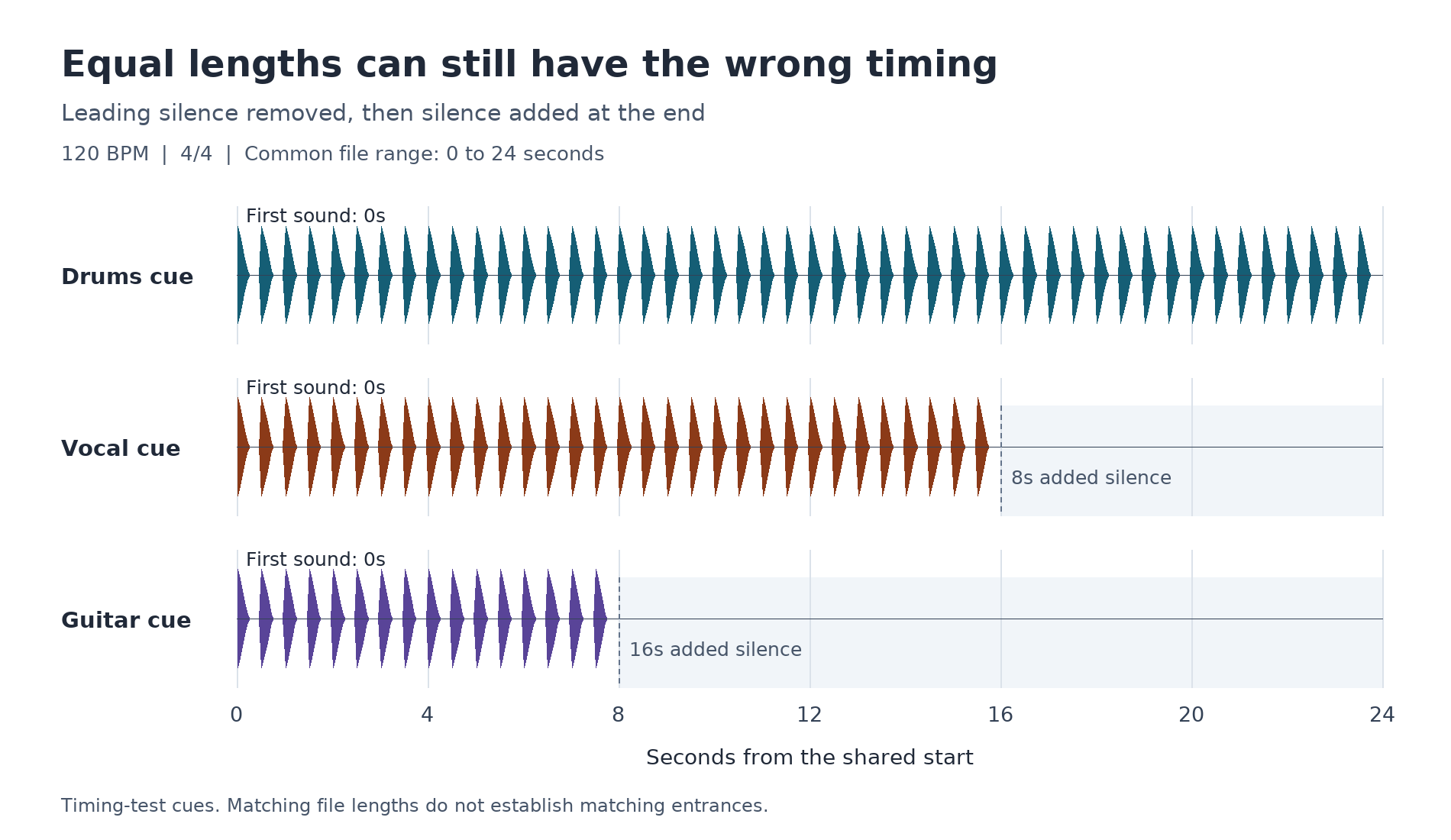
Export all three parts from zero to 24 seconds. The vocal file starts with eight seconds of silence; the guitar starts with sixteen. Place the three complete files at zero in another project and the entrances keep their places.
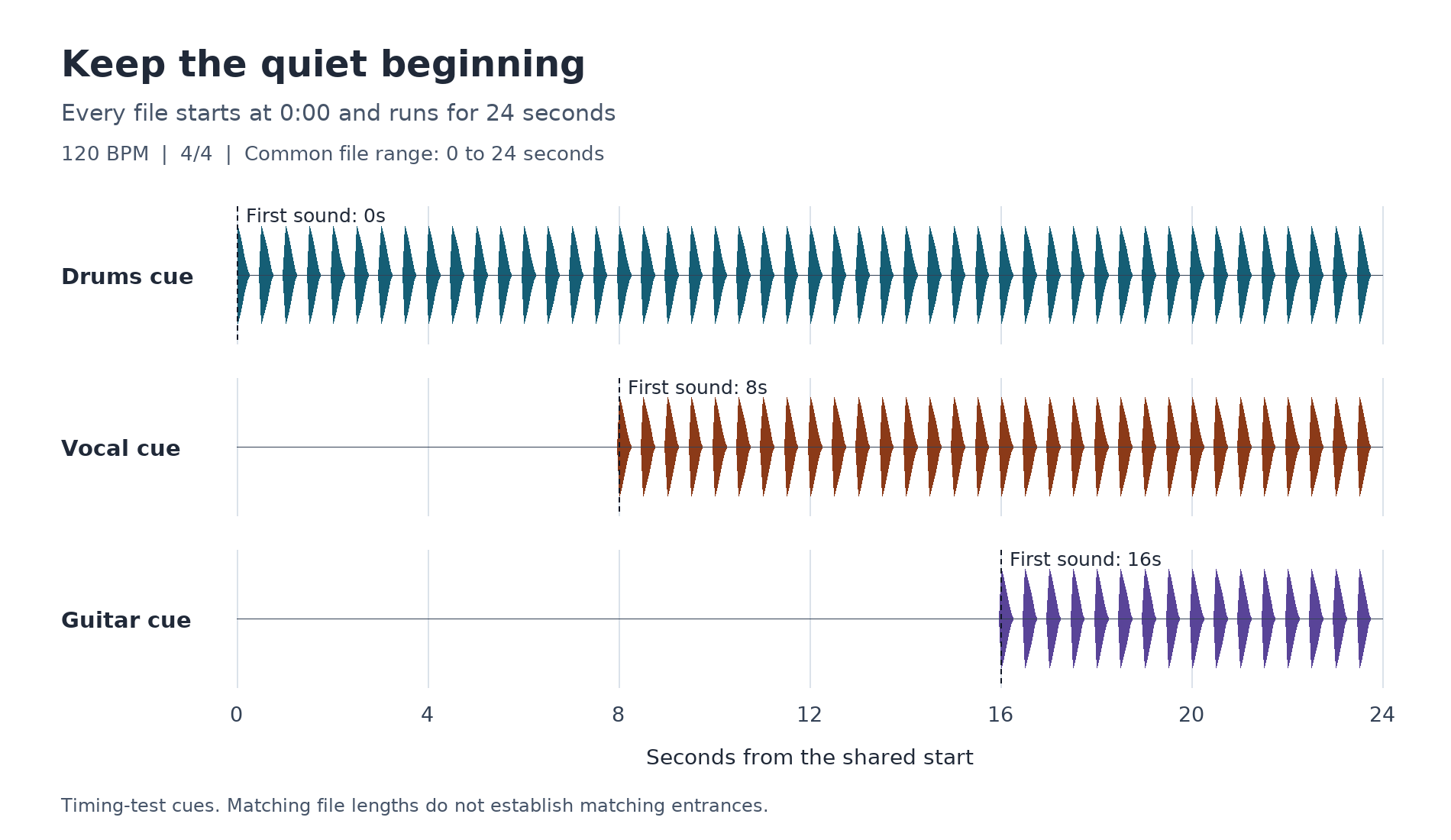
Now trim each one to its first sound and place those shortened files at zero. All three enter together. The notes are intact. The arrangement isn't.
Adding silence to the end until every file is 24 seconds long won't fix it. The files will look reassuringly equal in length while the vocal and guitar still enter early. Duration is a useful check, but it doesn't prove alignment.
+Read more: "Artists Don’t Just Choose a Mixing Engineer. They Choose Who to Trust With the Record."
Agree on what you're sending
A stem usually combines related tracks into one audio file, such as the whole drum section. Individual multitracks keep those tracks separate, such as kick, snare and each vocal. The shared-start check works for either. It helps to agree on which one your collaborator actually wants before exporting.
For a common-start delivery, use the same export range for every file, including the quiet beginning and enough room at the end for the intended sound to finish. Ableton's stem-export guidance explicitly recommends an arrangement-wide range regardless of when an instrument enters or ends.
There are other ways to preserve position. Timestamped Broadcast Wave files can carry location information; for example, Logic Pro can move compatible timestamped audio back to its recorded position. If that's the agreed handoff, test that placement. Don't switch between timestamp placement and a common-start method without telling the recipient.
For the example above, the delivery note can be this short:
120 BPM, 4/4. Place every file at bar 1. Each file runs from 0:00 to 0:24. Drums begin at bar 1, vocal at bar 5, guitar at bar 9.
That note gives the other person something concrete to check. It also tells you what has to survive the export.
Check the folder, not the session you remember
Open a new, empty project and import the exact files you intend to send. Keep the original project open separately if you need to compare, but don't borrow its clip positions to arrange the exports.
Set the agreed tempo. Put each full file on its own track with its beginning at the agreed origin. Check import settings that could move the start marker or stretch audio automatically. Ableton's import instructions call out Auto-Warp Long Samples for exactly this reason.
Then check the three entrances against the delivery note. If the vocal lands at zero instead of eight seconds, go back to the export. Nudging it into place in your test session would hide the problem from you and leave it for your collaborator.
Check a later entrance as well as the first one. A file whose beginning is right can still drift if its timing has been stretched. Also check the final intended sound, so an export boundary hasn't cut it short.
Keep a reference mix with the delivery, clearly labelled as a reference rather than another part to play alongside the stems. It gives the recipient the musical context. The import check establishes timing; matching every detail of the reference mix also depends on which effects and processing you included.
Before sending your next folder, find the part that enters last. Import it at the shared start and see whether it waits as long as it should.
The silence may be doing more work than you think.
+Read more: "AI Mastering Is Great Now. But the Human Touch Still Matters."
Keith Staggers is an independent R&B and soul artist based in Tampa.