

This article originally appeared on the Rebel Music Distribution Blog
You release a new single on Friday morning.
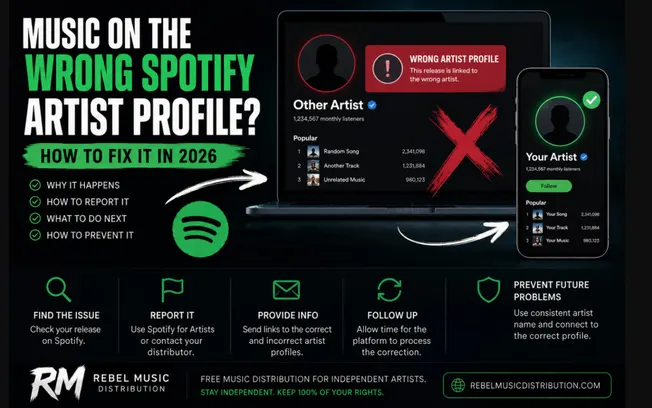
The Spotify link arrives, you open it expecting to see the track on your artist page — and instead you’re looking at somebody else’s profile. Same artist name. Different person. Different music.
Or maybe the opposite has happened: you open your own Spotify page and discover a song you’ve never heard before sitting between your releases.
It looks alarming, but it is more common than many independent artists realize. Artist-profile mix-ups can happen on Spotify, Apple Music and other streaming services, particularly when two musicians use the same or very similar artist names.
The good news is that in most cases this does not mean somebody has taken ownership of your music. It usually means the release has been connected to the wrong artist identity. And in 2026, artists have more ways to deal with the problem than they did a few years ago.
Let’s go through what actually causes it, what you should do when it happens, and — more importantly — how to reduce the chances of it happening again.

First: Don’t Delete the Release
This is probably the most useful piece of advice in this entire article. If your new single appears on the wrong artist page, your first instinct might be:
Take it down and upload it again.
Don’t do that unless your distributor specifically tells you to. A profile-mapping problem does not necessarily mean there is anything wrong with the release itself.
The audio may be correct. The ISRC may be correct. The metadata may be correct. The release may simply have been attached to the wrong artist profile at the streaming-service level. Deleting and re-uploading can create an entirely new set of problems.
You may end up with:
- duplicate releases
- new store links
- unnecessary processing delays
- multiple versions of the same track
- lost momentum around the release
- confusion for listeners
Fix the mapping problem first.
Why Does Music End Up on the Wrong Spotify Artist Profile?
Imagine two artists. One is an electronic producer from Italy called Nova. The other is an indie band in Canada called Nova.
To a human being, these are obviously two different artists. To a large music platform receiving millions of pieces of metadata, the distinction needs to be represented correctly in the data it receives.
If a release arrives without being associated with the intended artist identity correctly, the system may connect it to an existing artist with the same or similar name. This is one of the reasons artist identifiers matter. Your artist name is what the listener sees.
Behind that name, streaming platforms use internal identifiers to distinguish one artist from another. And that becomes increasingly important when the name isn’t unique.
A Unique Artist Name Helps — But It Doesn’t Solve Everything
Choosing a unique name is still one of the easiest ways to reduce future problems. Before launching a new artist project, search the name on:
- Spotify
- Apple Music
- YouTube
- TikTok
If seventeen active musicians already use the exact same name, you are creating unnecessary complications before releasing your first song. That doesn’t mean two artists can never share a name. They can. But the more common the name, the more carefully the artist identity needs to be handled during distribution.
For an established artist, changing a name simply to avoid a mapping problem is usually an overreaction. For somebody who hasn’t released anything yet? It is worth spending ten minutes checking.

+Read more: "A Guide to Pitching Music to Independent Spotify Playlists"
My Music Is on the Wrong Spotify Artist Profile. What Should I Do?
There are two main routes.
Option 1: Report It Through Spotify for Artists
Spotify has a specific process for music that has been mixed up between artists. This applies when:
- your music appears on somebody else’s profile
- another artist’s music appears on yours
- your catalog has been split between multiple Spotify artist profiles
If you have access to Spotify for Artists, you can report the content mismatch directly. You will normally need links to the affected release and artist profiles so Spotify can see exactly what has happened.
Don’t write a ten-paragraph explanation. Make the problem obvious. For example:
Incorrect artist page: [link]
Correct artist page: [link]
Affected release: [link]
Artist name: [name]
That’s usually far more useful than saying:
“My Spotify is completely broken and my new song is somewhere else.”
Support teams solve problems faster when they can identify the problem faster.
Option 2: Contact Your Distributor
Your distributor is also an important part of this process. Streaming platforms receive release data through distributors, and distributors may be able to correct artist mapping or submit updated information.
This is particularly important if the problem originates in the artist identity attached to the delivery. If you distribute through Rebel Music and notice that a release has landed on the wrong profile, send support:
- your artist name
- release title
- UPC if available
- correct artist profile link
- incorrect artist profile link
- link to the affected release
Sending all of that in the first message can save several emails back and forth. We would much rather receive one slightly boring email containing every relevant link than five messages saying:
“It still isn’t fixed.”
How Long Does Spotify Take to Fix a Wrong Artist Profile?
There is no timer you can reliably set. Straightforward mapping problems can sometimes be resolved relatively quickly, but every case is different.
The important thing is to understand that your distributor and Spotify are not editing a WordPress page. A correction may need to move through content systems and then propagate across the platform. That is why repeatedly submitting the same request every few hours usually doesn’t help.
Submit the correct information. Make sure the case is understood. Then allow the correction process to happen.
If nothing changes after a reasonable amount of time, follow up on the same issue rather than creating five slightly different support cases.
Spotify Added Artist Profile Protection in 2026
This is one of the more interesting changes for artists this year. Spotify introduced Artist Profile Protection, a feature designed to give artists more control over releases that attempt to appear under their identity.
Instead of discovering an incorrect release only after it has appeared publicly, eligible artists can review certain releases before they are associated with their artist profile.
For years, artist mapping has largely been a process artists noticed after something went wrong. Profile Protection moves part of that process earlier. For artists with common names — or those who have repeatedly had unrelated releases appear on their pages — this could become particularly useful.
If the feature is available on your Spotify for Artists account, it is worth understanding how it works rather than automatically enabling or ignoring it. Artists who collaborate frequently or release constantly may value a frictionless process more. Artists who repeatedly receive incorrect releases may value the extra approval step.
There isn’t one correct setting for everyone.

+Read more: "We Stopped Waiting to Be Chosen and Mailed 100,000 CDs Instead"
What Is a Spotify Artist ID?
Every Spotify artist profile has its own unique identifier. Your public name might be:
Midnight
But Spotify does not need to assume that every artist called Midnight is the same person.
The artist profile itself has a unique identity inside Spotify’s system. When a distributor can associate a release with the correct existing Spotify artist profile, it reduces ambiguity. This is particularly useful for:
- common artist names
- artists with an established catalog
- artists changing distributors
- projects that have previously experienced mapping problems
When uploading a new release, pay attention if your distributor asks whether you already have an existing Spotify artist profile.
Do not choose a random profile simply because the name matches. Open it. Check the music. Make sure it is actually you. This sounds almost embarrassingly obvious. It isn’t.
What If Somebody Else’s Song Appears on My Spotify Profile?
Treat it seriously, but don’t panic. An unrelated release appearing on your page can affect more than how your discography looks. Fans may think you released it. It can confuse your artist identity. And depending on how the release is associated, incorrect music can interfere with the data surrounding your profile.
Report it through Spotify for Artists as an artist mismatch.
If you know which distributor delivered your legitimate catalog, you can also contact them if necessary. The important distinction is this:
A metadata mix-up and copyright infringement are not automatically the same thing.
An artist with the same name may have done absolutely nothing wrong. Their legitimate release may simply have landed on your profile.
On the other hand, if somebody is deliberately using your artist identity, artwork, recordings or protected material, that is a different problem and may need to be reported as an infringement rather than a simple catalog mismatch.
Don’t assume malicious intent when the evidence points to a mapping error. But don’t ignore deliberate impersonation either.
My Music Is on the Wrong Apple Music Artist Page. What Now?
Apple Music can have the same basic problem. Two artists with identical or similar names can end up connected to the same artist page, or a release can appear under the wrong identity.
Apple Music for Artists provides a process for reporting artist catalog issues. The useful information is very similar to what you would prepare for Spotify:
- artist name
- affected album or release links
- link to the correct artist page
- details of which content belongs where
If the problem involves release metadata rather than the artist page itself, your distributor becomes especially important. Information such as track titles, release titles, release dates and other metadata is generally supplied to Apple through the label or distributor.
In practical terms:
Wrong page? Identify the correct and incorrect pages clearly.
Wrong release metadata? Talk to the distributor that delivered it.
Spotify and Apple Music Are Not Your Distributor Dashboard
This causes confusion surprisingly often. An artist notices a typo on Spotify and asks:
“Where do I edit it in Spotify for Artists?”
Usually, you don’t. The streaming service displays much of the release information that was delivered to it. If the title of your single is wrong because the wrong title was distributed, changing your Spotify profile bio isn’t going to fix it.
Common metadata corrections may need to come through the distributor, including things such as:
- artist name
- track title
- release title
- artwork
- release date
- featured artist roles
- track order
- explicit-content information
- credits
Think of the distributor as the source of the delivered release package. Spotify and Apple Music are displaying that package. That is why correcting information at the correct point in the chain matters.
What If My Artist Catalog Is Split Across Two Spotify Profiles?
This is another version of the same problem.
Suppose your first album is here:
Artist Profile A
Then your next single appears here:
Artist Profile B
Both profiles have your name. Both contain your music. But now your catalog is split. Do not create a third profile. And don’t re-upload everything.
Report that your catalog has been split and identify which artist page should be the correct destination. Provide links to both profiles and the relevant releases.
Once again, specificity is your friend.
Changing Distributor? Be Careful With Artist Mapping
Moving a catalog from one distributor to another is a moment when you should pay extra attention to existing artist identities. You already have:
- a Spotify artist page
- an Apple Music artist page
- an established catalog
- existing listeners
- existing release identifiers
You don’t want the new delivery treated as though you are an entirely new artist who happens to have the same name.
Before moving established releases, collect your existing artist links. Make sure the new distributor knows exactly which artist identity belongs to you. And if you are moving existing recordings, preserve the correct release information and identifiers wherever the migration process requires it.
Catalog migration should be deliberate. Not:
“I’ll delete everything tonight and see what happens tomorrow.”

+Read more: "You Released the Song. Now What?"
Should You Create a New Spotify Artist Profile Yourself?
Usually, no. A Spotify artist profile is normally created in connection with music being delivered to Spotify. You don’t need to invent a duplicate profile because the first release went to the wrong place. Once your music exists on Spotify, you can claim the appropriate artist profile through Spotify for Artists.
If mapping is wrong, correct the mapping. Don’t solve one identity problem by creating another identity problem.
How to Prevent Wrong Artist Profiles on Future Releases
There is no method that guarantees a mapping mistake can never happen, but you can reduce the risk significantly.
Keep Your Artist Name Consistent
Do not release as:
John Black
then:
JOHN BLACK
then:
John Black Official
then go back to:
John Black
unless there is an actual reason for a formal artist-name change.
Consistency helps everyone. Your distributor. The DSP. Search engines. Fans. And probably you six months later when you are trying to remember which spelling you used.
Use the Correct Existing Artist Profile
When submitting a new release, connect it to your existing artist identity where the distribution workflow allows it. Do not guess. Check the link.
If you have a common artist name, this is especially important.
Claim Spotify for Artists and Apple Music for Artists
Don’t wait until something goes wrong before claiming the tools built for your artist profiles. Having access helps you:
- monitor your catalog
- identify problems
- view performance data
- manage supported profile information
- communicate with the platform through artist-specific processes
You spent weeks making the music. Spend another few minutes claiming the pages where people actually listen to it.
Check Your Release When It Goes Live
Release day should include one extremely unglamorous task: Open the links.
Check:
- Spotify
- Apple Music
- YouTube Music
- other important DSPs for your audience
Confirm that:
- the track plays
- artwork is correct
- artist profile is correct
- title is correct
- featured artists are correct
You are not being paranoid. You are checking the product you just released.
Why Artist Identity Matters More in 2026
Digital music distribution has become remarkably accessible. That is overwhelmingly good for independent musicians. A bedroom producer can create a record in Serbia, collaborate with a vocalist in Brazil, release it internationally and reach a listener in Japan without ever entering a record-label office.
But easier access creates new identity problems too. There are more releases. More artists. More collaborations. More artists using similar names. And increasingly, more automatically generated content entering digital platforms. That makes accurate artist identity more important, not less.
The future of music distribution isn’t just about delivering audio files faster. It is also about making sure the right music is connected to the right artist.
How Rebel Music Handles Artist Profile Issues
At Rebel Music, we want artists to report mapping problems as soon as they notice them. If a Rebel Music release appears on an incorrect artist profile, contact support with the relevant information rather than deleting and re-uploading the release immediately. Send us:
- your artist name
- release title
- UPC
- affected store
- release link
- wrong artist profile
- correct artist profile
The clearer the request, the easier it is for the issue to be investigated and sent through the appropriate correction process.
If you’re preparing a new release and still need distribution, Rebel Music provides free music distribution for independent artists without an upfront standard distribution fee.